Pause and resume
If the work stops, export the entities not yet processed and pick up from there.

The software that looks up, downloads and requests the DURC certificates (social security compliance) of thousands of entities starting from an Excel file, and produces a report at the end. A check that took about 3 months of manual work is done in about 2 days.
3 months2 daysto check the DURC of thousands of entities
Before paying suppliers or granting contributions, Italian public administration must check the social security compliance of every entity on the DURC Online portal. But the portal works one entity at a time: search the tax code, open the document, download the PDF, record the outcome.
With lists of thousands of entities, the check becomes months of work for the organisation's staff, repeated at every deadline and taken away from tasks that really need people.
The operator signs in to DURC Online with their own SPID digital identity, as they already do today.
Load the Excel file with the tax codes or VAT numbers to check, in the layout agreed with the organisation.
The program looks up the DURCs one after another and downloads the available PDFs into a folder on the workstation.
At the end it produces the reports in separate files: downloaded DURCs, entities whose DURC must be requested, and any errors.
For entities without a DURC, the program fills in the request screens on its own: the operator only types the verification code.
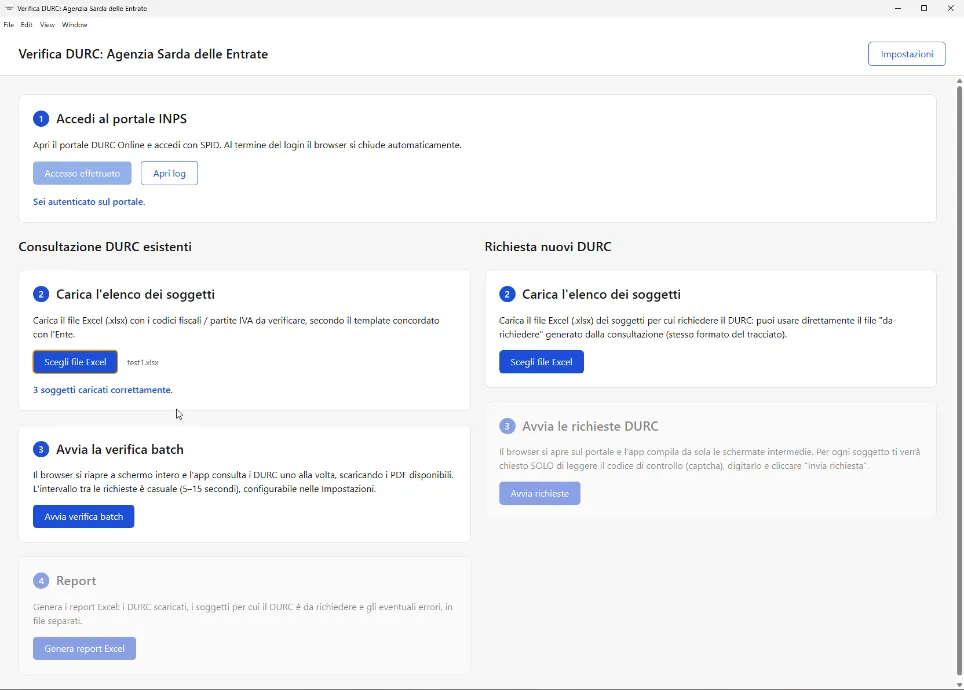
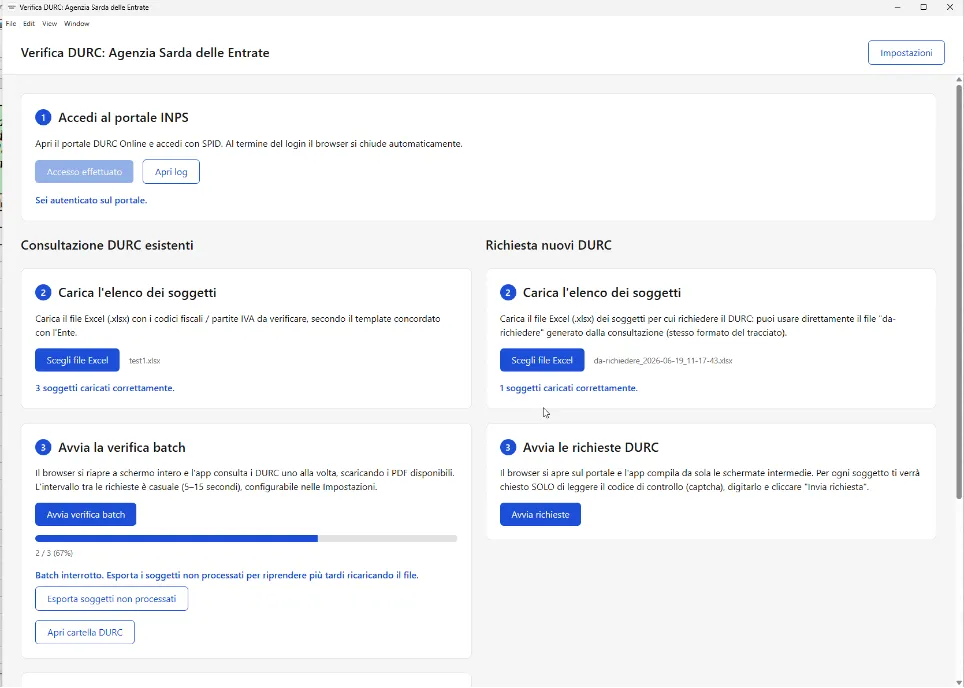
If the work stops, export the entities not yet processed and pick up from there.
The interval between one request and the next is set in the settings.
Excel layout, reports and procedure adapt to the way your office works.
A desktop app installed on the organisation's workstations, with staff training and support.
Yes. You load an Excel file with tax codes or VAT numbers and the program checks every entity automatically, downloads the available DURCs and produces a final report. In a real case, checking thousands of entities went from about 3 months to about 2 days.
Yes. The report gives the list of entities without a DURC and the program fills in the request screens on the portal: the operator only reads and types the verification code.
Yes. The program works in a browser window visible to the operator, who follows every step as it happens and can stop the operations at any time. Entities not yet processed can be exported to resume the work later.
Yes: access to the DURC Online portal uses the operator's SPID, exactly as for the manual check.
Yes. We agree the Excel file layout and the report format with the organisation, install the program on the workstations and train the staff.
We are registered on acquistinretepa.it (MePA). In the free discovery call we assess the organisation's needs and the procurement method together.
Tell us how many entities you check and how often: in a free 20-minute call we tell you how much time you can save.